Introduction to Spark Streaming
Table of Contents
What is Spark Streaming?
In many big data systems today, data often arrives continuously rather than as a complete dataset. This necessitates a system that can process streaming data efficiently. Apache Spark is one such system, and it processes streaming data through its structured streaming and micro-batching mechanisms.
Concept of Micro-Batching
Spark processes streaming data using a micro-batch model. Incoming data is grouped into small, fixed-time intervals called micro-batches. Each micro-batch is then processed in parallel across multiple nodes in a cluster, leveraging Spark’s distributed computing capabilities.
Within each microbatch:
- Each node works on a partition of the micro-batch, maintaining its own local state (e.g., intermediate results or aggregations).
- Nodes optionally persist their local state into durable storage like HDFS or S3 to ensure fault tolerance and recovery.
How Does Spark Handle Failures?
Spark ensures fault tolerance by using checkpointing. Checkpointing saves the local state of each node at the end of processing each micro batch. Therefore, if processing fails during batch 4, Spark reverts to the state saved at the end of batch 3 and restarts batch 4.
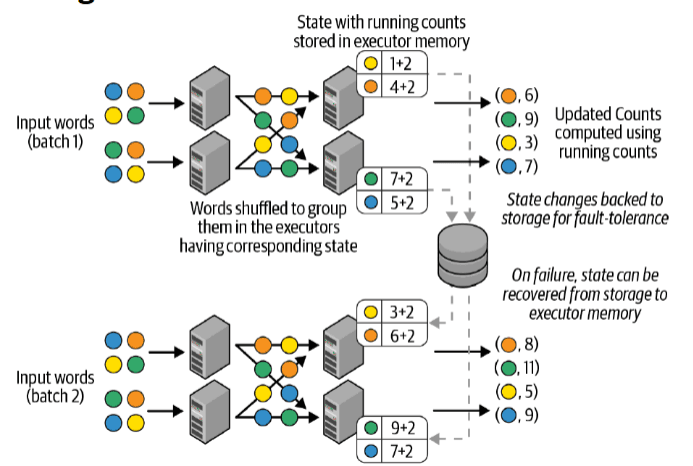
In the diagram above, we are counting the count of each word. We can see that microbatch 1 is being distributed among different executor nodes, and each executor node contains their own local state, storing the counts for the words they process. At the end of the microbatch, we persist their local stage into a storage for fault tolerance. When we process batch 2, failure occurs. We can then recover the state from storage back to our executor memory, and continue processing batch 2 from there.
Time based aggregation
Spark also supports time-based aggregations, where we can group data by time. Before diving into how time-based aggregations work in Spark, it is important to understand two key terms. Event-time refers to the time when the event is generated in Spark, while processing time refers to the time Spark receives the event for processing. In time-based aggregations, we aim to group by event-time, as this ensures the aggregation is consistent (since processing time can vary depending on network traffic).
In Spark, when performing time-based aggregations, we can define the event-time window size, specify how frequently the window should be triggered, and set a watermark. The watermark is used to determine when an event window should be dropped from memory. Below is an example of a time-based aggregation.
1import org.apache.spark.sql.functions._
2import org.apache.spark.sql.streaming.Trigger
3import org.apache.spark.sql.SparkSession
4
5object TimeBasedAggregationExample {
6  def main(args: Array[String]): Unit = {
7    val spark = SparkSession.builder
8      .appName("TimeBasedAggregationExample")
9      .getOrCreate()
10
11    // Read stream from a source (e.g., Kafka, socket, etc.)
12    val inputStream = spark
13      .readStream
14      .format("socket") // You can replace with a different source like Kafka or file
15      .option("host", "localhost")
16      .option("port", 9999)
17      .load()
18
19    // Define a schema for the incoming data
20    val wordsStream = inputStream
21      .selectExpr("explode(split(value, ' ')) as word")
22
23    // Define event-time window size (10 seconds) and watermark (1 minute)
24    val wordCountStream = wordsStream
25      .withWatermark("timestamp", "1 minute")
26      .groupBy(window(col("timestamp"), "10 seconds"), col("word"))
27      .count()
28
29    // Output the result to the console (or any other sink like Kafka, Delta, etc.)
30    val query = wordCountStream
31      .writeStream
32      .outputMode("complete")
33      .trigger(Trigger.ProcessingTime("5 seconds"))  // Trigger the window every 5 seconds
34      .format("console")
35      .start()
36
37    query.awaitTermination()
38  }
39}
40
The results of the code above is displayed below
1+--------------------+-----+-----+
2|             window | word|count|
3+--------------------+-----+-----+
4|[2024-11-26 12:00:00, 2024-11-26 12:00:10]| hello| 2|
5|[2024-11-26 12:00:00, 2024-11-26 12:00:10]| world| 2|
6|[2024-11-26 12:00:00, 2024-11-26 12:00:10]| spark| 1|
7+--------------------+-----+-----+
8|[2024-11-26 12:00:10, 2024-11-26 12:00:20]| hello| 2|
9|[2024-11-26 12:00:10, 2024-11-26 12:00:20]| world| 1|
10|[2024-11-26 12:00:10, 2024-11-26 12:00:20]| spark| 2|
11+--------------------+-----+-----+
12|[2024-11-26 12:00:20, 2024-11-26 12:00:30]| hello| 1|
13|[2024-11-26 12:00:20, 2024-11-26 12:00:30]| world| 1|
14|[2024-11-26 12:00:20, 2024-11-26 12:00:30]| spark| 1|
15+--------------------+-----+-----+
16
Explaining watermark
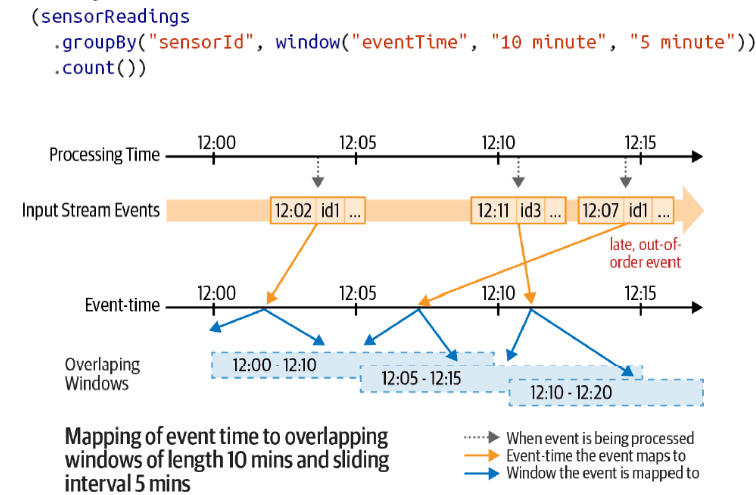
So why do we need watermarks? In the diagram above, We have set our event-time window to be 10 minutes, and are triggering a result table every 5 minutes. At 12:15 when we trigger our result table, we would have 3 event-time windows,(12:00 - 12:10, 12:05 - 12:15, 1210 - 12:20). When we receive the 12:07 event, we are still able to update the 12:00 - 12:10 window as well as the 12:05 - 12:15 window. Now the question is, if we maintain all event-time windows to cater for late events, then our result table will be growing longer and longer, and since our result table is maintained in spark memory, at certain points, we will need to let go of earlier event-time windows.
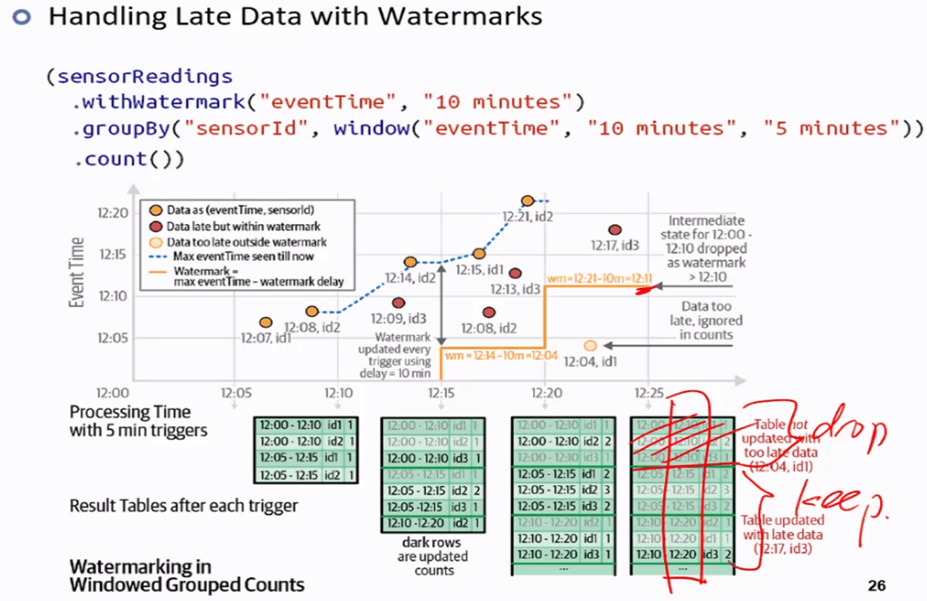
Watermarks can be used to help us determine what event-windows to drop. In this example, the user sets a watermark with event time 10 minutes. While triggering each result table, we will then calculate the minimum for the next result table, which is simply computed by taking the latest event received so far - watermark set by the user. When triggering a result table at 12:20, we calculate the limit to be 12:21 - 10 = 12:11, therefore, when we trigger the result table at 12:25, we can safely drop the 12:00 - 12:10 window as 12:10 is before 12:11.