Understanding Computer Networking
Table of Contents
How Does Networking Work?
On the internet, every device is identified by an IP (Internet Protocol) address, allowing communication between devices by forwarding data packets to the correct destination IP. To put it simply, each machine will run a process(program), which is running on a certain port number. When we want to send a packet to this particular machine, we will first need to create a TCP/UDP packet, specify the port number to forward to, wrap it with an IP header, which specifies the source IP and destination IP, before wrapping it in an ethernet frame and forwarding it.
How Does a Machine Get Its IP Address?
When a device first connects to a network, it doesn't initially have an IP address. Instead, it relies on a DHCP (Dynamic Host Configuration Protocol) server to assign it one. This DHCP server not only provides the device with an IP address but also sends the IP address of the local DNS (Domain Name System) server and the network's default gateway.
With this information, the device can send packets to its default gateway (often a router) whenever it wants to communicate with another device on the network or the internet.
How Does a Device Forward a Packet to Its Default Gateway?
Knowing the IP address of the default gateway alone is not enough to send a packet directly. While IP addresses are essential for routing packets across networks, forwarding data to another device on the same local network requires the MAC (Media Access Control) address.
To obtain the MAC address of its default gateway, the device uses ARP (Address Resolution Protocol). It broadcasts an ARP request on the network, asking, "Who has this IP address?" The device with the matching IP responds with its MAC address, allowing the source device to forward the packet to the correct destination on the local network.
What happens at the router?
After arriving at the router, the packet would be inspected for the destination IP address. The router then checks its own routing table to find the most specific(longest) matching prefix for the destination IP address. Based on the match, the router determines which output interface to forward this packet out of.
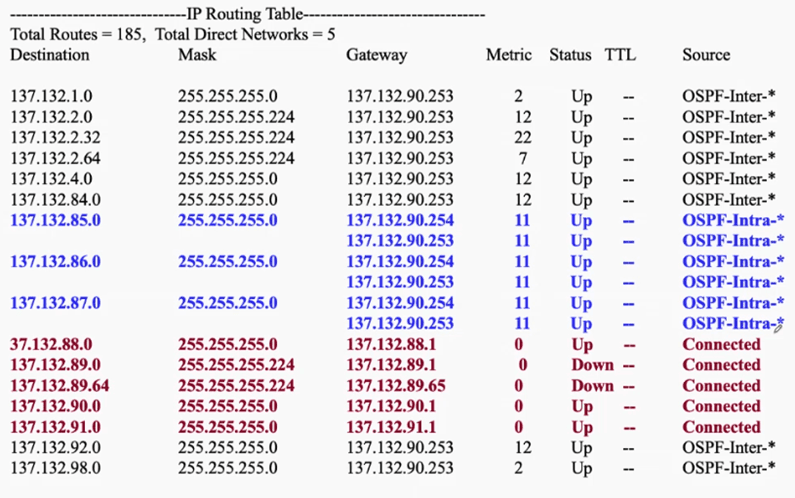
The image above shows a routing table found in all routers. Prior to this, the router would have already used inter-domain routing protocols like OSPF or RIP to calculate the next hop and their cost for various destination IP addresses. We will then look for the shortest distance(defined as metric) based on our destination IP to determine the next hop to forward this packet to.
The Seven Layers of Networking
Networking comprise of 7 layers (Application, Presentation, Session, Transport, Network, Link, Physical).
Application Layer
Interface for end-user applications
Presentation Layer
Data formatting and encryption
Session Layer
Manages sessions and connections
Transport Layer
Ensures data transfer to the corresponding process
Network Layer
Manages data routing using IP
Link Layer
Node-to-node data transfer
Physical Layer
Hardware component transmission