Explaining Kafka
Table of Contents
Understanding Basic Kafka Terminologies
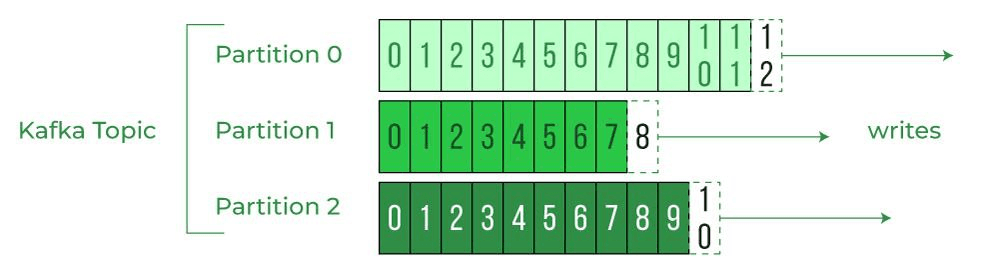
Kafka topics are categories used to organize messages. Each topic has a name that is unique across the entire kafka cluster. Producers write messages to a topic, while consumers read messages from a topic. Within a topic, there are multiple partitions, each with its own offset. When a producer sends a message to a topic, it is appended to the end of the partition log and assigned a new offset. When a consumer subscribe to a topic, they pull messages from the partition in the order they're stored. They maintain their current offset, which indicates the last processed message in each partition.
What is Zookeeper?
Zookeeper is used for managing and coordinating distributed systems. It stores metadata about the kafka cluster, such as the list of active kafka brokers in the cluster and their availability. Zookeeper also maintains metadata about topics such as number of partitions and replicas for each topic, as well as partition assignment. This includes determining which broker acts as the leader for each partition and the replicas designated for failover, ensuring high availability and fault tolerance.
What about brokers?
Brokers are key components in kafka responsible for handling the storage, distribution and retrieval of data in kafka topics. They store messages on disk in partitions that belong to topics. Each partition is a log file containing an ordered sequence of messages. Brokers also replicate partitions across other brokers for fault tolerance. This ensures data availability even if one broker fails.
Kafka brokers receive messages from producers and append them to the appropriate partition in the respective topic. Once the messages are successfully written, brokers will provide an acknowledgement to the producer.
Kafka brokers provide consumers with messages stored in partitions. They handle offset tracking and allow consumers to pull data at their own pace
Each partition in a topic is assigned a leader broker which handles all read and write requests for that partition. Other brokers store replicas of the partition, ensuring fault tolerance. In the event of a leader failure, a follower replica is promoted to the leader role. In a Kafka cluster, partitions are distributed across brokers to balance the workload. This enables kafka to scale horizontally by adding more brokers to handle increased throughput. Producers and consumers are redirected to the appropriate broker based on partition assignments.
Creating additional brokers in AWS EC2 involves deploying more EC2 instances, installing/configuring kafka on them, and integrating these instances into the existing cluster.
How Does Kafka Ensure Parallel Processing?
Kafka uses a group ID, a unique string that identifies a group of consumers working together to consume messages from a topic. Each consumer informs the Kafka broker of the group it belongs to, and the broker ensures that partitions are evenly distributed among the consumers within the group. The broker continuously monitors and redistributes partitions as needed to maintain this balance. This mechanism enables parallel message processing, allowing multiple consumers in the same group to collaboratively handle messages from one or more topics. It provides scalability, fault tolerance, and efficient parallel processing in a distributed Kafka environment.
Kafka dynamically adjusts partition assignments as consumers join or leave the group, redistributing partitions to maintain balance and fault tolerance. This capability allows the system to scale horizontally by simply adding more consumers to the group, making it highly efficient for distributed processing in a Kafka environment.
To further enhance parallelism, you can increase the concurrency level within the same consumer group. By specifying a concurrency level in the @KafkaListenerannotation, Kafka creates multiple listener instances under the same group. These instances collaboratively process messages, distributing the workload among themselves to complete tasks faster and improve throughput.
1@KafkaListener(topics = "books", groupId = "book-notification-consumer", concurrency = "2")
2public void bookNotificationConsumer(BookEvent event) {
3    logger.info("Books event received for notification => {}", event);
4}
If we need to consume the same messages multiple times and apply distinct processing logic for each listener, then we can configure@KafkaListener annotation to have distinct group IDs. In the example below, we have a Kafka topic called books, and we need to handle events from this topic in two ways: Full-text search indexing, Price indexing. By assigning distinct group IDs, we ensure that each consumer group processes the same messages independently, applying the respective logic without interfering with each other.
1@KafkaListener(topics = "books", groupId = "books-content-search")
2public void bookContentSearchConsumer(BookEvent event) {
3    logger.info("Books event received for full-text search indexing => {}", event);
4}
5
6@KafkaListener(topics = "books", groupId = "books-price-index")
7public void bookPriceIndexerConsumer(BookEvent event) {
8    logger.info("Books event received for price indexing => {}", event);
9}
How does Kafka ensure reliability?
Acknowledgements (Producer & Consumer)
Kafka uses acknowledgements at both the producer and consumer level to ensure reliability and control delivery guarantees. On the producer side, acknowledgements determine when a message is considered successfully written:
acks=0 means fire-and-forget with no guarantee. acks=1 means the leader acknowledges after writing the message. acks=all means all in-sync replicas acknowledge the message, providing the strongest durability.
On the consumer side, acknowledgements are handled through offset commits. A consumer acknowledges a message by committing its offset after processing. If a consumer crashes before committing, the message will be re-delivered. If it commits before processing and then crashes, the message may be lost. This tradeoff directly determines the delivery semantics of the system.
Preventing Duplicate Consumers
Kafka prevents multiple consumers from processing the same message by using partitions and consumer groups. Each partition is assigned to only one consumer within a group at any given time. This ensures that messages in a partition are processed by a single consumer, avoiding duplicate work within the group. In contrast, systems like RabbitMQ rely on channels and explicit acknowledgements to ensure that only one consumer processes a message at a time.
Consumer Failures & Reprocessing
If a consumer crashes after processing a message but before committing its offset, Kafka will re-deliver the message. This can lead to duplicate processing and is the reason why understanding delivery guarantees is important.
Delivery Guarantees
At least once
Every message is guaranteed to be delivered at least one time. However, duplicates may occur, so consumers must be idempotent.
For example, setting a user's profile picture twice is harmless, but subtracting 50 from an account balance is not. Instead, systems should perform idempotent operations such as setting a final value (e.g. update balance to 54) rather than applying incremental changes.
At most once
Messages are delivered at most once, meaning they may be lost but will never be duplicated. This is typically used for non-critical workloads such as metrics or analytics, where losing some data is acceptable.
Exactly once
Exactly-once delivery is extremely difficult to achieve in distributed systems. Kafka provides idempotent producers and transactional APIs to approximate this guarantee, but it requires careful system design.
In practice, at-least-once delivery is the most commonly used approach in production systems.
Durability & Fault Tolerance
Kafka improves reliability by acting as a buffer between services. If a downstream service goes offline, Kafka retains messages and allows processing to resume once the service recovers, ensuring that no work is lost.
Partitioning in Kafka
What is Partitioning?
Partitioning is the process of splitting a Kafka topic into multiple independent sub-queues called partitions. This allows multiple consumers to process data in parallel, significantly improving throughput and scalability.
Parallelism and Consumer Groups
Within a consumer group, partitions are distributed among consumers so that each partition is processed by only one consumer at a time. This enables parallel processing while ensuring that messages within a single partition are not processed concurrently by multiple consumers.
Importance of Partition Key
The partition key determines which partition a message is sent to. It is similar to choosing a shard key in distributed databases. Messages with the same partition key are always routed to the same partition. This is important because Kafka guarantees ordering only within a partition.
Ordering Guarantees
Kafka guarantees that messages within a partition are processed in order. However, there is no ordering guarantee across different partitions.
For example, if a user deposits 100 and then withdraws 50, these operations must be processed in sequence. If they are sent to different partitions, the withdrawal could be processed first and incorrectly rejected.
By using a consistent partition key such as accountId, both messages will be routed to the same partition, preserving the correct order of operations.
Tradeoff: Ordering vs Distribution
A good partition key should also distribute load evenly across partitions. However, the key that ensures correct ordering (e.g. accountId) may not always provide the best distribution. This creates a tradeoff between maintaining strict ordering and achieving optimal load balancing. Choosing the right partition key requires careful consideration of both factors.
Backpressure
Backpressure is a mechanism used to handle situations where producers generate messages faster than consumers can process them. If left unchecked, this mismatch causes the queue to grow indefinitely, leading to increased latency, memory pressure, and potential system failure.
Instead of allowing the system to become overwhelmed, backpressure introduces control by slowing down producers or limiting incoming traffic. This ensures that the system remains stable and operates within its processing capacity.
Common backpressure strategies include throttling producers, buffering messages up to a limit, and rejecting or dropping excess requests when the system is under heavy load. In distributed systems, this often involves signaling mechanisms where consumers inform producers to reduce their rate of message production.
Dead Letter Queue
A Dead Letter Queue (DLQ) is used to handle messages that cannot be successfully processed by consumers. Failures can occur for various reasons, such as corrupted data, invalid message formats, or downstream service errors.
Instead of retrying indefinitely, systems typically configure a maximum retry count. If a message continues to fail after reaching this limit, it is moved to the dead letter queue to prevent it from blocking or slowing down normal message processing.
The DLQ acts as a separate queue or partition that stores failed messages for later inspection. Engineers can analyze these messages to identify root causes, fix issues, and optionally reprocess them once the problem has been resolved.
Replication
Kafka ensures durability and fault tolerance by persisting messages to disk and replicating them across multiple brokers. Each partition can have multiple replicas, distributed across different nodes in the cluster.
One replica is designated as the leader, which handles all reads and writes, while the others act as followers that continuously sync data from the leader. If a broker fails, one of the in-sync replicas is automatically promoted to leader, ensuring minimal disruption and no data loss (depending on configuration).
In addition, Kafka stores messages on disk for a configurable retention period (e.g., 1 day or more), regardless of whether they have been consumed. This allows consumers to replay historical messages, making it a powerful mechanism for recovery, debugging, and rebuilding state.
What Makes Kafka Fast?
1. Sequential I/O
One of the main reasons Kafka is fast is that it relies heavily on sequential I/O. Instead of constantly modifying arbitrary locations on disk, Kafka stores messages in an append-only log.
When a producer sends a message to Kafka, the message is appended to the end of the partition's log. Kafka generally does not need to search for an empty location or randomly update existing messages.
Sequential writes are much more efficient than random writes, particularly for traditional hard disks. Even with SSDs, sequential access patterns are generally beneficial because they allow the storage system to process large, contiguous blocks of data efficiently.
Kafka also treats the log as an immutable sequence of records. Consumers do not require Kafka to modify or remove messages when they read them. Instead, consumers keep track of their position in the log using an offset.
2. Efficient Data Transfer
Kafka is fundamentally a system that moves large amounts of data: data arrives from producers, is persisted to disk, and is then transferred over the network to consumers.
Because Kafka can transfer huge amounts of data, the overhead of repeatedly copying that data between different parts of memory can become significant. Kafka therefore tries to minimize unnecessary data copying.
Without Zero-Copy
Consider a consumer requesting a message that is stored on disk. Without a zero-copy mechanism, the data may go through several different buffers before reaching the network.
1Disk
2  ↓
3OS Page Cache
4  ↓
5Kafka Application Memory
6  ↓
7Socket Buffer
8  ↓
9Network Interface
10  ↓
11Consumer
Conceptually, the process looks like this:
1. The operating system loads the requested data from disk into the OS page cache.
2. The data may then be copied from the OS page cache into the Kafka application's memory.
3. Kafka copies the data into a socket buffer so that it can be sent over the network.
4. The network stack then transfers the data toward the network interface.
The exact number of memory copies depends on the operating system and networking implementation, but the important idea is that the CPU may be involved in moving the same data through multiple buffers.
Zero-Copy
Kafka can take advantage of a technique called zero-copy to reduce these unnecessary data copies. On systems that support it, Kafka can use thesendfile() system call to ask the operating system to transfer data directly from the file/page cache to the network socket.
1Disk
2  ↓
3OS Page Cache
4  │
5  │ sendfile()
6  ↓
7Network Socket
8  ↓
9Network Interface
10  ↓
11Consumer
The important difference is that the Kafka application does not need to read the entire message into its own application memory and then copy it back into the socket buffer. Instead, the operating system can perform the transfer on behalf of Kafka.
Modern network interfaces can also use DMA (Direct Memory Access). DMA allows hardware such as the network interface card to transfer data without requiring the CPU to manually copy every byte.
This reduces CPU overhead and unnecessary memory copies, which is particularly valuable for Kafka because Kafka frequently moves large amounts of data from disk to the network.
Putting It Together
Kafka's performance comes from combining several efficient design choices:
Sequential I/O: Messages are appended to an append-only log rather than being written randomly across the disk.
Immutable log: Once records are written, consumers simply read them using offsets rather than requiring Kafka to modify the records.
Batching: Kafka can batch multiple records together, reducing the overhead of individual network and disk operations.
Zero-copy: Data can be transferred from the OS page cache to the network with fewer unnecessary copies through mechanisms such as sendfile().
DMA: Network hardware can transfer data with minimal CPU involvement.
The overall idea is that Kafka is designed to move large amounts of data while doing as little unnecessary work as possible. Sequential access makes storage efficient, batching reduces per-message overhead, and zero-copy reduces the CPU and memory overhead involved in moving data from disk to the network.