How do databases handle recovery
Table of Contents
Introduction to recovery logging
Database systems use Write-Ahead Logging (WAL) to ensure durability and crash recovery. Logs are stored in stable storage, which refers to storage systems that can survive crashes and media failures. Stability is usually achieved by maintaining multiple copies of data on non-volatile storage devices.
Every log record is assigned a unique identifier known as a Log Sequence Number (LSN). LSNs are monotonically increasing, meaning newer log records always have larger LSN values than older records. Recently generated log records are first buffered in main memory before being flushed to disk.
The recovery manager keeps track of the latest log record written to disk using a metadata value called flushedLSN. In addition, every data page maintains a pageLSN, which stores the LSN of the most recent update applied to that page.
The pageLSN helps the recovery system determine whether a log record has already been applied to a page during the redo phase. If the page's LSN on disk is greater than or equal to the log record's LSN, the recovery manager can safely skip reapplying that operation because the update is already persisted.
Transaction Table (TT)
The Transaction Table contains one entry for each active transaction.
• XactID — unique transaction identifier
• lastLSN — LSN of the most recent log record generated by the transaction
• Status — indicates whether the transaction has committed (C) or remains uncommitted (U)
Dirty Page Table (DPT)
The Dirty Page Table tracks pages in the buffer pool that have been modified but not yet written back to disk.
• pageID — identifier of the dirty page
• recLSN — the earliest log record responsible for making the page dirty
Unlike pageLSN, which stores the most recent update applied to a page, the recLSN in the Dirty Page Table stores the earliest log record that caused the page to become dirty. During recovery, this allows the redo phase to identify the correct starting point for replaying updates.

Update Log Records
Whenever a transaction updates a page P, the system generates an update log record r. The page's pageLSN is then updated to match the LSN of r.
The pageLSN stores the LSN of the most recent update applied to a specific copy of the page. During crash recovery, the recovery manager compares a log record's LSN with the pageLSN of the page stored on disk. If the pageLSN on disk is already greater than or equal to the log record's LSN, the update has already been persisted and the redo operation can be skipped.
An update log record typically contains:
• pageID — page being modified
• offset — byte offset indicating where the modification begins
• length — number of modified bytes
• before-image — original value before modification
• after-image — updated value after modification
To undo the actions of a transaction, the recovery manager scans the transaction's log records in reverse order and restores each record's before-image.
Updating the Transaction Table (TT)
Whenever a new log record is generated for a transaction, the recovery manager updates the Transaction Table to track the transaction's progress and most recent log record.
• When the first log record is created for transaction T, a new Transaction Table entry is created with status U (uncommitted)
• Whenever a new log record r is generated for T, the transaction's lastLSN is updated to r's LSN
• If transaction T commits, its status is updated to C (committed)
• When an end log record is written for transaction T, its entry is removed from the Transaction Table
Updating the Dirty Page Table (DPT)
The Dirty Page Table tracks pages in the buffer pool that have been modified but not yet flushed to disk.
• When a page P is updated and does not already exist in the Dirty Page Table, a new DPT entry is created
• The page's recLSN is set to the LSN of the first update that caused the page to become dirty
• When a dirty page is eventually flushed to disk, its entry is removed from the Dirty Page Table
Implementing Abort
When a transaction aborts, the database system must undo all updates made by the transaction to restore the database to a consistent state. This process relies heavily on Write-Ahead Logging (WAL) and recovery metadata stored in the log.
Write-Ahead Logging (WAL)
The WAL protocol ensures that log records are safely persisted before modified database pages are written to disk. In particular, the before-image of an update must always be flushed to the log before the updated page itself is flushed to disk.
To enforce the WAL protocol:
• Before flushing a database page P to disk, ensure that all log records up to P.pageLSN have already been flushed to stable storage
• This guarantees that P.pageLSN ≤ flushedLSN before the page is written to disk
This rule is critical because if a crash occurs after a dirty page is written but before its corresponding log records are persisted, the database would not have enough information to correctly undo or redo the operation during recovery.
Undoing Transaction Updates
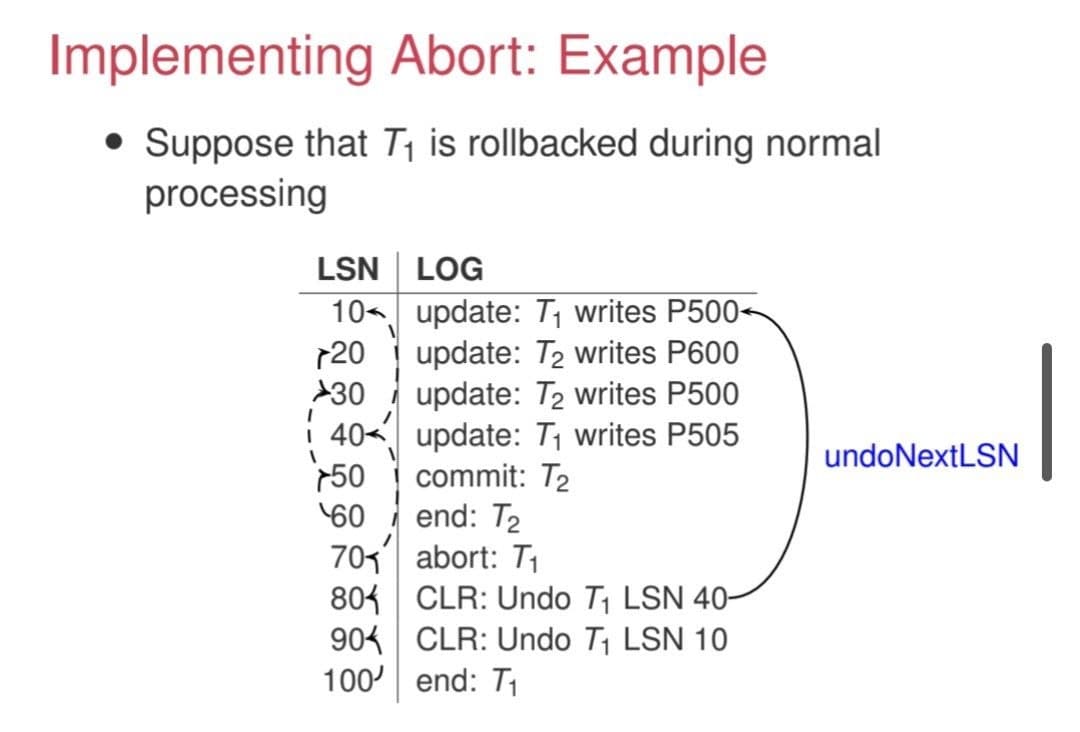
To abort a transaction, the recovery manager scans the transaction's log records in reverse order and restores each record's before-image. This effectively reverses all updates performed by the transaction.
Retrieving Log Records Efficiently
The Transaction Table (TT) helps the recovery manager efficiently locate a transaction's log records during undo processing.
• Each active transaction has an entry in the Transaction Table
• Every entry stores the transaction's most recent log record using lastLSN
• The recovery manager starts from lastLSN and follows the prevLSN pointers stored in each log record
• This allows log records to be traversed efficiently in reverse chronological order
Compensation Log Records (CLRs)
Changes made during undo operations are also logged using Compensation Log Records (CLRs). Logging undo actions ensures that recovery remains crash-safe even if another system failure occurs while the abort is still in progress.
CLRs prevent the same undo operation from being repeated multiple times during repeated crash recoveries and allow the recovery process to resume safely from where it previously stopped.
Implementing Commit
When a transaction commits, the database system must guarantee that all of the transaction's updates are safely stored in stable storage. This ensures that committed changes are never lost, even if the system crashes immediately after the commit operation completes.
Force-at-Commit Protocol
Database systems enforce durability using the force-at-commit protocol. Under this protocol, a transaction cannot be considered committed until all of its after-images are guaranteed to exist in stable storage, either in the database itself or in the recovery log.
To enforce the force-at-commit protocol:
• A commit log record is first generated for the transaction
• All log records associated with the transaction are flushed to stable storage
• The transaction is considered committed only after the commit log record has been successfully written to disk
Importantly, the actual modified database pages do not necessarily need to be flushed to disk immediately at commit time. As long as the corresponding log records containing the after-images are safely persisted, the updates can be recovered later through the redo phase of crash recovery.
This design improves performance by allowing database pages to be written lazily while still guaranteeing transaction durability and consistency.
Crash Recovery Phases
When a system crash occurs, the database must recover to a consistent state without losing committed updates. Modern recovery algorithms such as ARIES perform recovery in three phases: Analysis, Redo, and Undo.
1. Analysis Phase
The analysis phase reconstructs the state of the system at the time of the crash. During this phase, the recovery manager scans the log to identify:
• Active transactions that had not yet completed when the crash occurred
• Dirty pages in the buffer pool that may contain updates not yet written to disk
• The Transaction Table (TT) and Dirty Page Table (DPT) required for recovery
2. Redo Phase
The redo phase repeats history by replaying log records and restoring the database to the exact state it was in immediately before the crash occurred.
During redo, the recovery manager compares each log record's LSN with the pageLSN stored on the corresponding page on disk.
• If pageLSN < logLSN, the update has not yet been persisted and must be reapplied
• If pageLSN ≥ logLSN, the update already exists on disk and the redo operation can be skipped
Repeating history ensures that both committed and uncommitted updates are restored exactly as they existed before the crash.
3. Undo Phase
After redo completes, the undo phase reverses the effects of transactions that were still active at the time of the crash. The recovery manager traverses each transaction's log records in reverse order and restores the corresponding before-images.
To efficiently locate a transaction's log records, the recovery manager starts from the transaction's lastLSN in the Transaction Table and follows the prevLSN pointers stored in each log record.
Every undo operation is itself logged using a Compensation Log Record (CLR). Logging undo actions ensures that recovery remains crash-safe even if another crash occurs during the undo process.
By combining analysis, redo, and undo phases, ARIES guarantees database consistency, durability, and crash recovery correctness.
Analysis Phase
The analysis phase is the first stage of ARIES crash recovery. Its purpose is to reconstruct the state of the system at the moment the crash occurred.
During this phase, the recovery manager performs three main tasks:
• Determines the point in the log where the redo phase should begin
• Identifies the set of pages that may have been dirty at the time of the crash
• Identifies transactions that were still active when the system crashed
Reconstructing Recovery Metadata
At the start of analysis, both the Dirty Page Table (DPT) and Transaction Table (TT) are initialized as empty. The recovery manager then scans the log forward, processing each log record one at a time.
Updating the Transaction Table (TT)
• If transaction T does not already exist in the Transaction Table, a new entry is created
• The transaction's lastLSN is updated to the LSN of the current log record
• If the current log record is a commit record, the transaction's status is updated to C (committed)
• If the current log record is an end record, the transaction is removed from the Transaction Table
Updating the Dirty Page Table (DPT)
• If a redoable log record modifies page P and P is not already in the Dirty Page Table, a new DPT entry is created
• The page's recLSN is set to the LSN of the log record that first caused the page to become dirty
The Dirty Page Table produced during analysis is only a superset of dirty pages because some pages may have already been flushed to disk before the crash occurred.
Result of the Analysis Phase
At the end of analysis:
• The Transaction Table contains all transactions that were still active at the time of the crash
• The Dirty Page Table contains pages that may require redo during recovery
• The recovery manager has identified the correct starting point for the redo phase
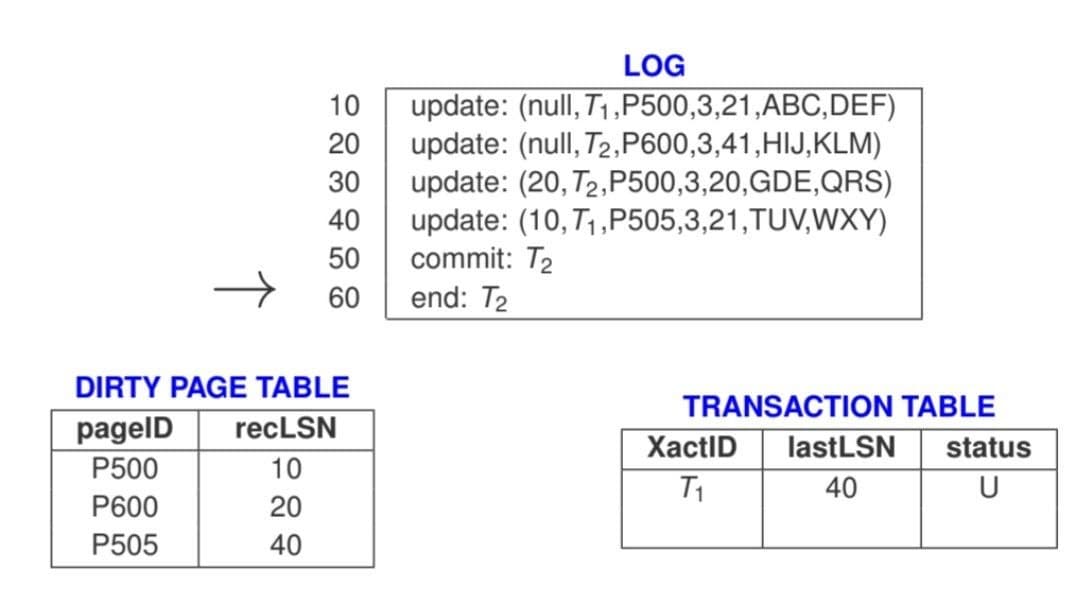
In this example, transaction T1 remains active at the time of the crash, while pages P500, P600, and P505 are identified as dirty pages that may require redo processing.
Redo Phase
The redo phase restores the database to the exact state it was in immediately before the crash occurred. ARIES achieves this by repeating history, meaning that both committed and uncommitted updates are replayed exactly as they originally happened.
Determining the Redo Starting Point
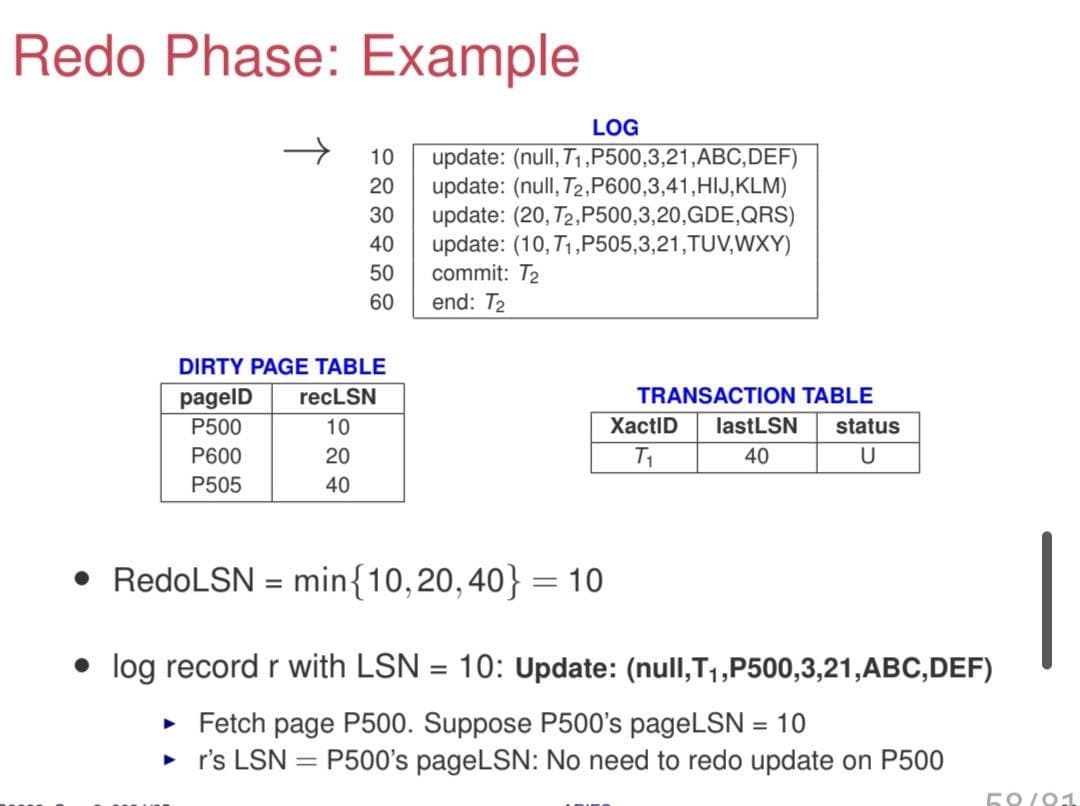
Redo processing begins from the smallest recLSN found in the Dirty Page Table (DPT). This value is known as the RedoLSN.
Since recLSN represents the earliest update that may not yet have been written to disk, starting redo from the smallest recLSN guarantees that no necessary updates are missed.
• RedoLSN = smallest recLSN among all dirty pages in the DPT
• Let r be the log record whose LSN equals RedoLSN
• The recovery manager scans the log forward starting from r
Reapplying Updates
During the scan, redoable update log records and Compensation Log Records (CLRs) are examined.
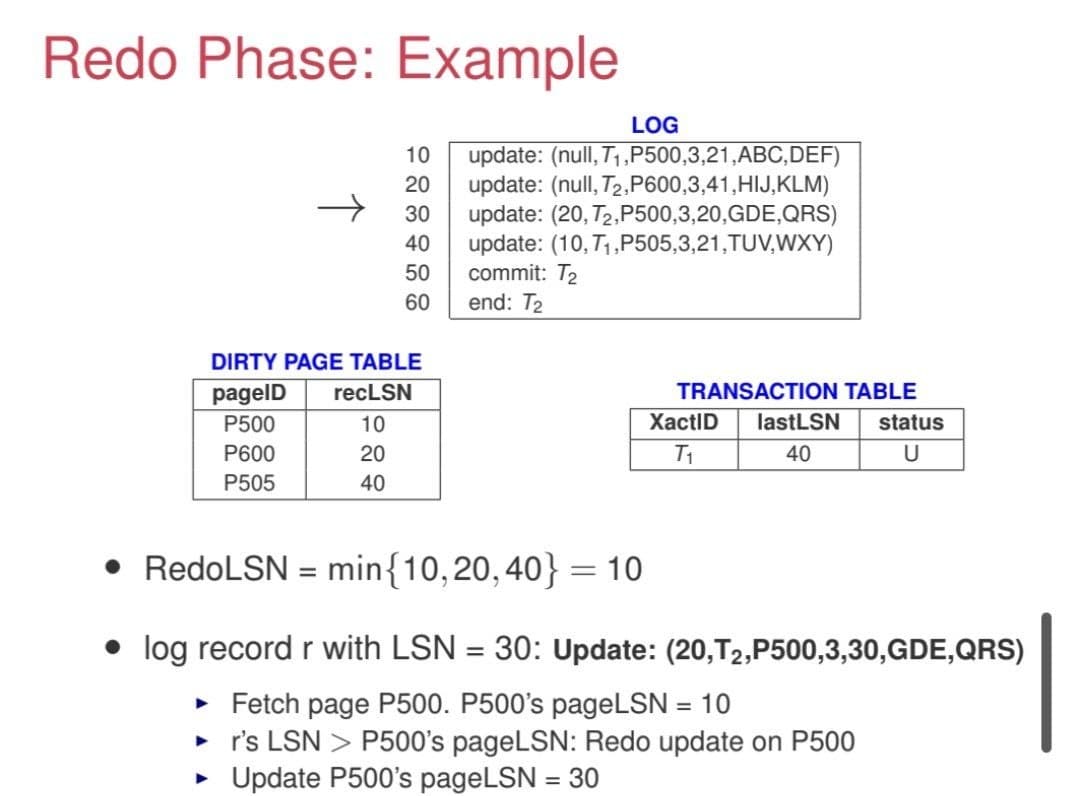
• If the log record is an update log record or a CLR, fetch the corresponding page P
• Compare the page's pageLSN with the log record's LSN
• If P.pageLSN < r.LSN, the update has not yet been persisted and must be reapplied
• After reapplying the update, update P.pageLSN to match r.LSN
• If P.pageLSN ≥ r.LSN, the update already exists on disk and redo can be skipped
Using pageLSN prevents unnecessary redo operations and ensures that updates are not applied multiple times.
Completing the Redo Phase
At the end of redo:
• Transactions in the Transaction Table with status C are completed by writing end log records
• Their entries are removed from the Transaction Table
• The database is restored to the exact state it was in at the moment of the crash
Undo Phase
The undo phase is responsible for rolling back the effects of transactions that were still active (uncommitted) at the time of the crash. These are often referred to as loser transactions.
The goal is to restore the database to a consistent state by reversing all updates performed by these transactions in the correct order.
Initialization
The undo process begins by initializing a set L, which contains the lastLSN of all transactions in the Transaction Table (TT) that have status U (uncommitted).
Iterative Undo Process
The system repeatedly processes the largest LSN in the set L until it becomes empty. This ensures that updates are undone in reverse chronological order.
• Remove the largest LSN from L and locate the corresponding log record r
• If r is an update log record for transaction T:
⋆ Create a Compensation Log Record (CLR) r2
⋆ Set r2.undoNextLSN to r.prevLSN
⋆ Update Transaction Table entry: lastLSN = r2.LSN
⋆ Restore the page using the before-image in the log record
⋆ Update P.pageLSN = r2.LSN
⋆ Continue undo using r.prevLSN
• If r is a CLR:
⋆ Continue undo using r.undoNextLSN
• If r is an abort log record:
⋆ Continue undo using r.prevLSN
Managing the Undo Set (L)
After processing a log record, the system updates the undo set:
• If the next LSN is not null, it is added back into L
• If the next LSN is null, an end log record is written for the transaction and its entry is removed from the Transaction Table
Completion
The undo phase completes when all loser transactions have been fully rolled back and removed from the Transaction Table. At this point, the database is restored to a consistent state.
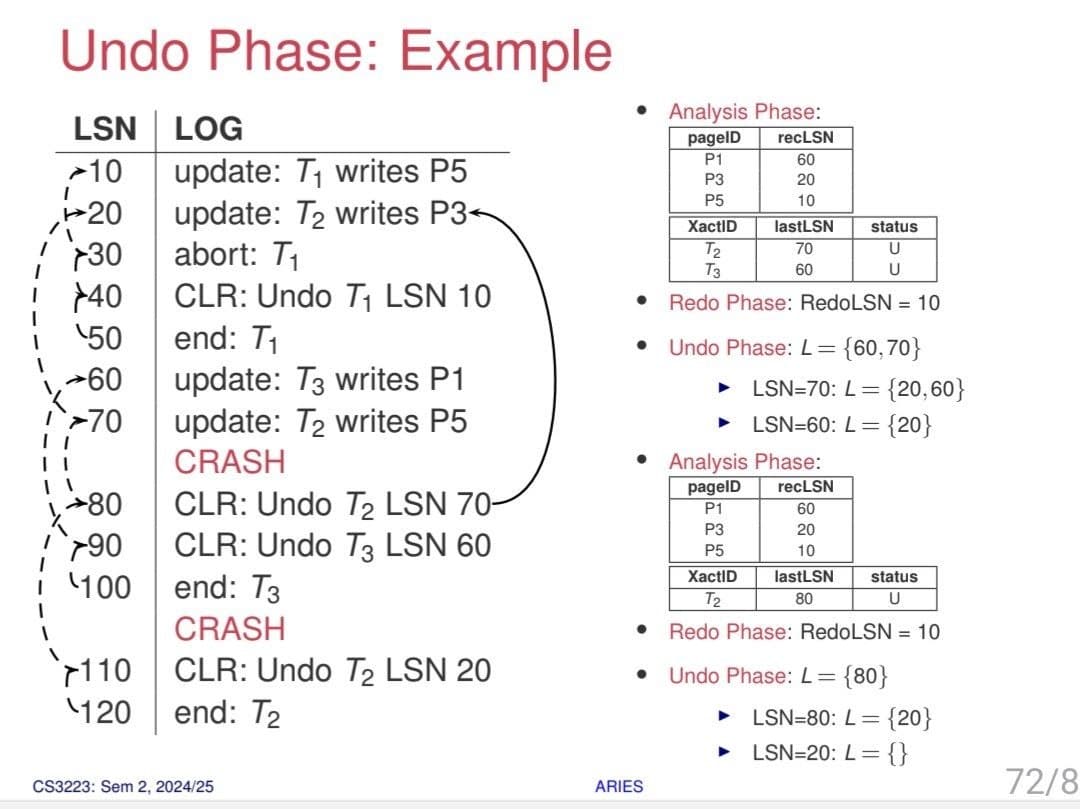
The redo phase and undo phase serve fundamentally different purposes in recovery. Redo focuses on reapplying all actions up to the crash to ensure the database reflects everything that had been persisted (or should have been persisted) at the time of failure, regardless of whether transactions were committed. In contrast, undo focuses only on rolling back uncommitted (loser) transactions, removing their effects so that only committed work remains in the final database state.